HackTheBox Labs Writeup - Whisper

이 글은 HackTheBox 의 Easy 난이도 Sherlock 인 Whisper 에 대한 Writeup이다.
머신 정보에서 아래와 같은 시나리오를 제공한다. 시나리오 내용을 대충 요약하면 2025-01-21 에 해킹이 있었으니 포렌식하여 이에 대한 정보를 수집하라는 내용이다.
Sherlock Scenario
The SOC team received an alert on 21st January 2025 about suspicious activity originating from an employee's system (Alpha). Alpha was not authorized to engage in any offensive hacking activities within the network. The Incident Response (IR) team quickly acted, isolating the system so you can perform a thorough triage and investigation to determine the scope of the breach and potential impact on the network.
주어진 파일은 Windows 시스템의 핵심 정보를 덤프한 내용이다. 이 Writeup 에서는 포렌식을 위해 Eric Zimmerman's Tools 에서 제공하는 툴을 사용했다.
Task 1
Task 1: What is the hostname of the company computer involved in the unauthorized activity?
Registry Explorer 툴로 Windows\System32\config\SYSTEM 파일을 열어 호스트 이름을 알아내야 한다. 해당 파일을 열려고 하면 dirty hive 에러가 발생하며 로딩에 실패한다.
rla 툴을 다운로드, 실행해 dirty hive 상태를 복구해야 한다.
rla.exe -d "C:\SYSTEM\파일이_있는_폴더경로" --out "복구된_파일을_저장할_경로"
Registry Explorer 로 dirty hive 상태를 복구한 로그를 로딩하면 문제에서 제공하는 머신의 레지스트리 상태를 확인할 수 있다. Root\ControlSet001\Control\ComputerName\ComputerName 에서 컴퓨터 이름이 HELPDESK인 것을 확인할 수 있다.
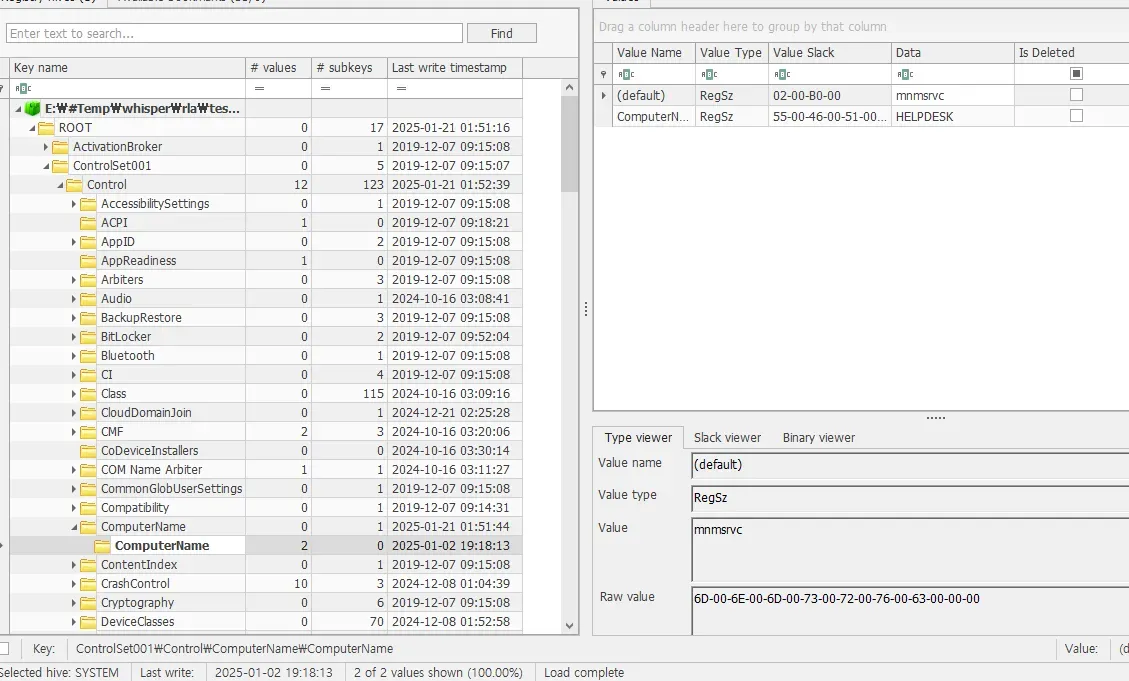
Answer : HELPDESK
Task 2
Task 2: What is the IP address associated with the machine?
Task1 과 마찬가지로 Registry Explorer 로 Windows\System32\config\SYSTEM 를 로딩한다. Root\ControlSet001\Services\Tcpip\Parameters\Interfaces Key의 DHCPIP Address 값을 찾을 수 있다.
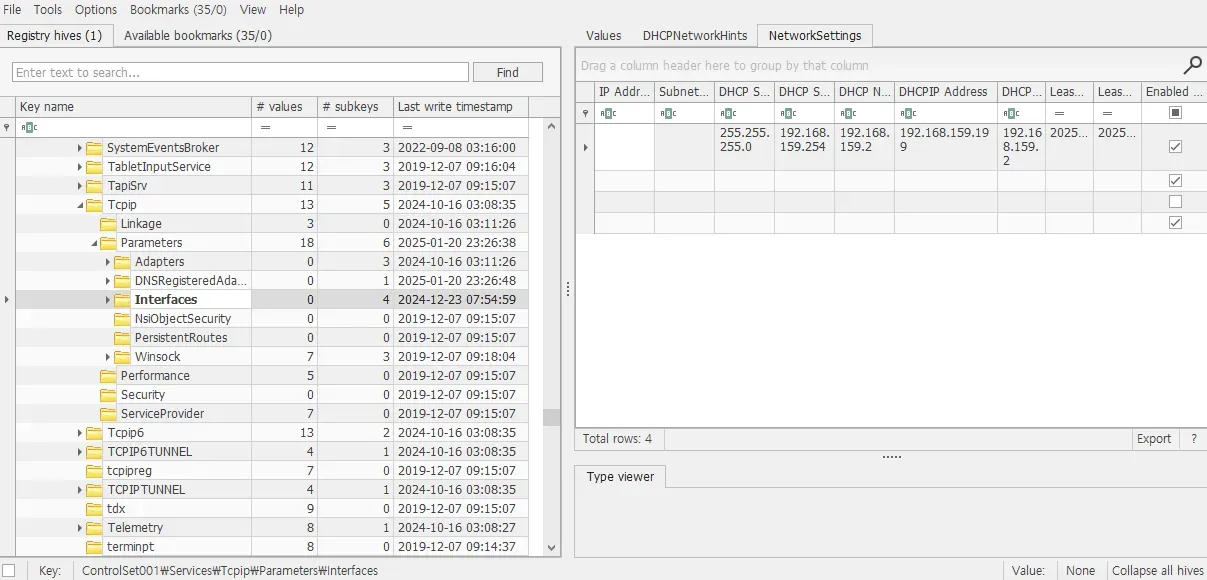
Answer : 192.168.159.199
Task 3
Task 3 : What is the Security Identifier (SID) of the computer involved in the incident?
Windows 에서 머신의 SID 는 S-1-5-21-X-Y-Z 와 같은 포맷을 가진다. X,Y,Z는 머신의 고유 값이며, 유저 SID 는 뒤에 고유의 RID가 추가된다.
Registry Explorer 로 dirty hive를 복구한 Security 하이브를 열자. Root\Policy\Accounts 에서 여러 Key 값을 확인할 수 있다. 그 중 S-1-5-21-953115734-2025219997-3674921352-501 이 앞서 말한 유저 SID 이다. 마지막 값이 501인 것으로 보아 Guest 계정이며, 따라서 머신 SID 는 S-1-5-21-953115734-2025219997-3674921352 이다.
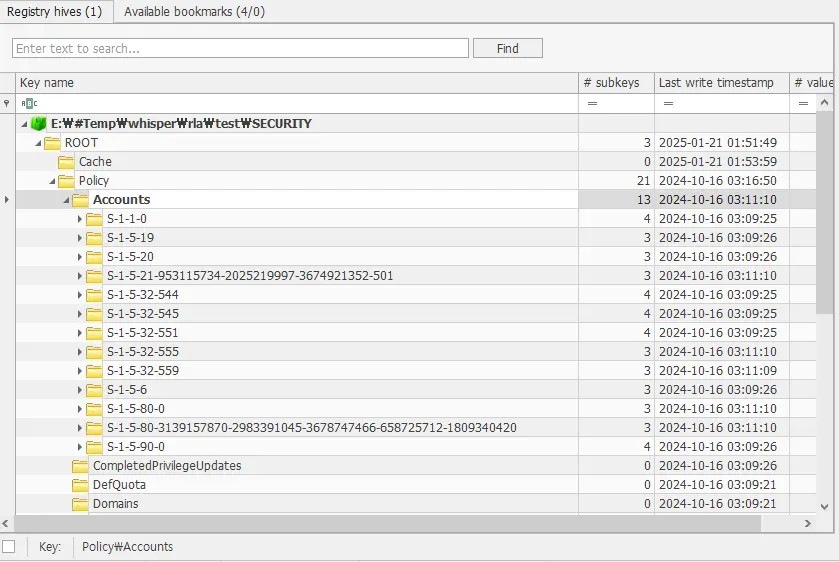
Answer : S-1-5-21-953115734-2025219997-3674921352
Task 4
Task 4: What was the timezone setting of the machine?
Registry Explorer 로 SYSTEM 하이브를 연다. ControlSet001\Control\TimeZoneInformation 에서 머신의 타임존을 확인할 수 있다.
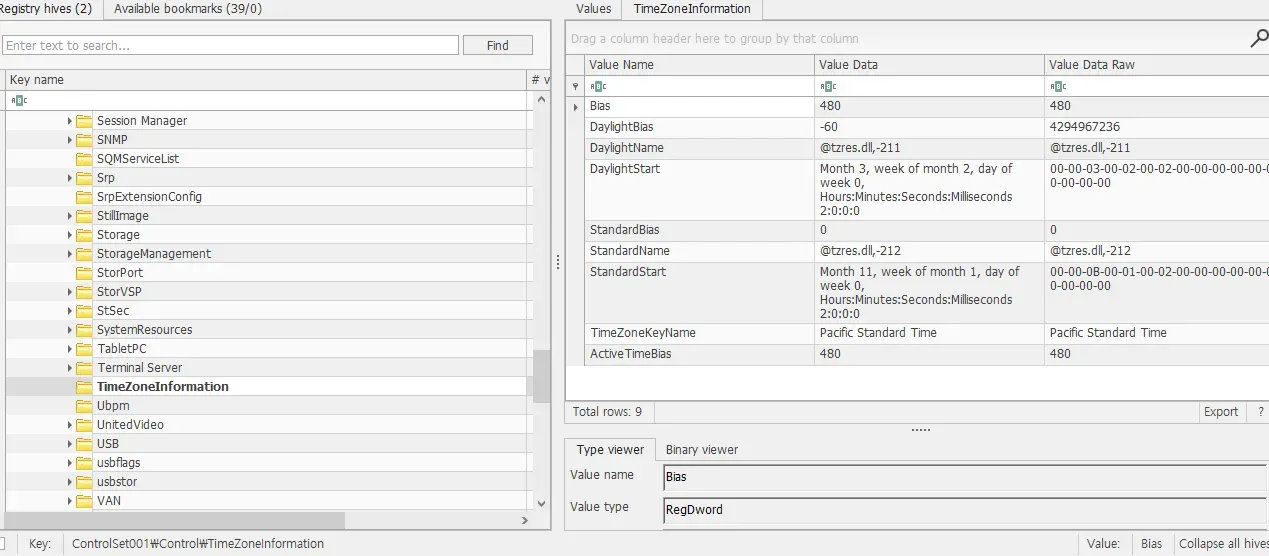
Answer : Pacific Standard Time
Task 5
Task 5 : Which tool did the attacker use to escalate privileges and extract sensitive credentials from the system?
Whisper\C\Windows\prefetch 폴더에서 MIMIKATZ.EXE-7A038744.pf, MIMIKATZ.EXE-D870B873.pf 파일을 확인할 수 있다. prefetch는 Windows 에서 이미 실행된 파일을 다시 실행할 때 성능 향상을 위해 준비된 .pf 파일을 저장하는 공간이다. 그리고 MIMIKATZ 는 크리덴셜 탈취에 사용되는 유명한 프로그램이다.
Answer : MIMIKATZ.EXE
Task 6
Task 6 What is the timestamp of the last execution of the credential extraction tool on the system used by the attacker?
prefetch 폴더에는 MIMIKATZ.EXE-7A038744.pf, MIMIKATZ.EXE-D870B873.pf 두 파일이 있다. 둘 다 PECmd 툴로 정보를 확인해보자.
> E:\#Temp\whisper\PECmd\PECmd.exe -f E:\#Temp\whisper\Whisper\C\Windows\prefetch\MIMIKATZ.EXE-7A038744.pf
PECmd version 1.5.1.0

Author: Eric Zimmerman (saericzimmerman@gmail.com)
https://github.com/EricZimmerman/PECmd

Command line: -f E:\#Temp\whisper\Whisper\C\Windows\prefetch\MIMIKATZ.EXE-7A038744.pf

Warning: Administrator privileges not found!

Keywords: temp, tmp

Processing E:\#Temp\whisper\Whisper\C\Windows\prefetch\MIMIKATZ.EXE-7A038744.pf

Created on: 2025-01-20 07:21:44
Modified on: 2026-02-26 12:32:58
Last accessed on: 2026-03-02 14:48:00

Executable name: MIMIKATZ.EXE
Hash: 7A038744
File size (bytes): 26,124
Version: Windows 10 or Windows 11

Run count: 2
Last run: 2025-01-21 00:21:41
Other run times: 2025-01-21 00:21:01
> E:\#Temp\whisper\PECmd\PECmd.exe -f E:\#Temp\whisper\Whisper\C\Windows\prefetch\MIMIKATZ.EXE-D870B873.pf
PECmd version 1.5.1.0

Author: Eric Zimmerman (saericzimmerman@gmail.com)
https://github.com/EricZimmerman/PECmd

Command line: -f E:\#Temp\whisper\Whisper\C\Windows\prefetch\MIMIKATZ.EXE-D870B873.pf

Warning: Administrator privileges not found!

Keywords: temp, tmp

Processing E:\#Temp\whisper\Whisper\C\Windows\prefetch\MIMIKATZ.EXE-D870B873.pf

Created on: 2025-01-04 05:00:20
Modified on: 2026-02-26 12:32:58
Last accessed on: 2026-03-02 14:52:52

Executable name: MIMIKATZ.EXE
Hash: D870B873
File size (bytes): 25,290
Version: Windows 10 or Windows 11

Run count: 15
Last run: 2025-01-04 22:00:10
Other run times: 2025-01-04 18:05:23, 2025-01-04 16:31:06, 2025-01-04 16:26:38, 2025-01-03 14:09:00, 2025-01-02 22:26:49, 2025-01-02 22:08:46, 2025-01-02 22:08:39

Volume information:
Last Run 값이 각각 2025-01-21 00:21:41 과 2025-01-04 22:00:10 다. 따라서 가장 마지막으로 실행된건 2025-01-21 00:21:41 다.
Answer : 2025-01-21 00:21:41
Task 7
Task 7 : What is the timestamp when the attacker first downloaded the credential extraction tool onto the system?
Whisper\C\$MFT 파일은 시스템의 파일 생성,수정된 시간, 경로, 등 다양한 정보를 가진다.
MFTECmd.exe 툴로 $MFT 파일을 분석, 분석 결과를 csv로 생성한다.
MFTECmd.exe -f "$MFT" --csv output\ --csvf mft.csv
문제에서 다운로드한 파일을 찾으라 했으니 MIMIKATZ.EXE를 직접 찾으면 못 찾는다. csv 파일을 보면 .\Users\Alpha\Downloads 경로에 mimikatz_trunk.zip 파일이 다운로드된 이력을 확인할 수 있다. 이 파일의 첫 생성 시간은 2025-01-21 00:20:15.4467169 이다.
Answer : 2025-01-21 00:20:15
Task 8
Task 8 : After using the previously mentioned tool, the attacker downloaded a script to scan the domain controller. What is the URL from which the attacker downloaded this script?
시나리오에서 Alpha 유저가 침해되었다고 명시하고 있으니 Alpha를 먼저 확인해보자. Whisper\C\Users\Alpha\AppData\Local\Microsoft\Edge\User Data\Default 경로의 History 파일은 SQL DB이며, Edge 브라우저로 사용한 흔적들이 남아 있다. 해당 파일을 SQLite Browser 로 열어 download 테이블을 살펴보니 C:\Users\Alpha\Downloads\DC-Scan.ps1 경로에 파워셸 스크립트를 다운로드한 이력이 있고, 다운로드한 URL은 https://mega.nz/file/I31zBZTb#H5aUJamEj2xMroi9baoTKCMjQF1jiV8TK9gbjoNGgkw 이다.
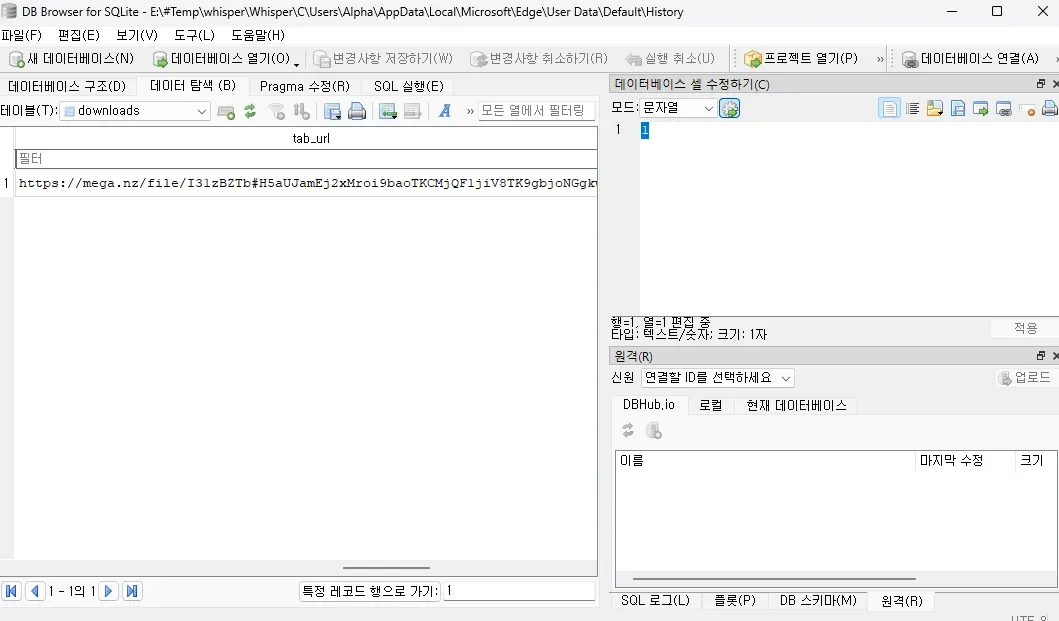
Answer : https://mega.nz/file/I31zBZTb#H5aUJamEj2xMroi9baoTKCMjQF1jiV8TK9gbjoNGgkw
Task 9
Task 9 : What is the filename of the script? (Format - Full path of file, starting with drive letter)
위에서 이미 설명했다.
Answer : C:\Users\Alpha\Downloads\DC-Scan.ps1
Task 10
Task 10 : What is the timestamp indicating when the attacker deleted the script after it was downloaded?
Whisper\C\$Extend 경로의 $J 파일은 파일의 변경 이력에 대한 정보를 가진다. $MFT와 마찬가지로 MFTECmd.exe 파일로 분석하여 결과를 생성한다.
MFTECmd.exe -f "$J" --csv output\ --csvf j.csv
DC-Scan.ps1 파일에 대한 내용을 검색하여 파일 삭제 시간이 2025-01-21 01:27:47.4269871인 것을 확인할 수 있다.
Answer : 2025-01-21 01:27:47
Task 11
Task 11 : What is the name of the shared file that the attacker accessed?
각 유저의 NTUSER.DAT 파일은 사용자에 대한 정보를 하이브 형태로 저장한다. 공격 당한 유저는 Alpha 이니 Whisper\C\Users\Alpha\NTUSER.DAT 파일에 대해 dirty hive 복구를 시도하자.
rla.exe -f E:\#Temp\whisper\Whisper\C\Users\Alpha\NTUSER.DAT --out alpha_ntuser
Registry Explorer 로 열어 Root\SOFTWARE\Microsoft\Windows\CurrentVersion\Explorer\RecentDocs 경로를 살펴보면 최근에 접근한 파일을 확인할 수 있다.
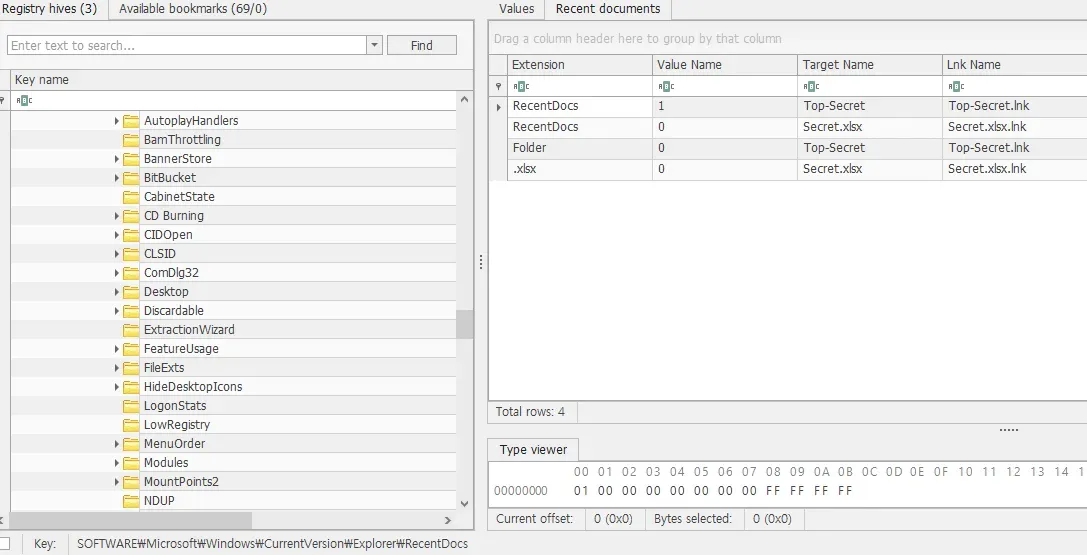
Answer : \\CYBERUP\Users\Administrator\Desktop\Top-Secret\Secret.xlsx
Task 12
Task 12 : To persist, the attacker created a new user account. What is the SID of the newly created account?
Whisper\C\Windows\System32\winevt\Logs 경로에서 Security.evtx 파일을 찾아 연다.
계정 생성 이벤트만 찾아야 하니 우측에서 현재 로그 필터링 버튼을 클릭, 계정 생성 이벤트 ID인 4720을 지정한다.
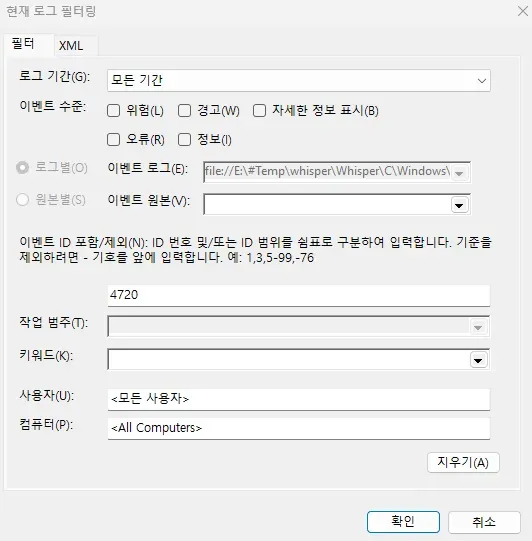
필터링하면 단 하나의 이벤트만 검색된다. Admin 이라는 이름의 계정이 생성되었고 SID 는 S-1-5-21-953115734-2025219997-3674921352-1002 이다.
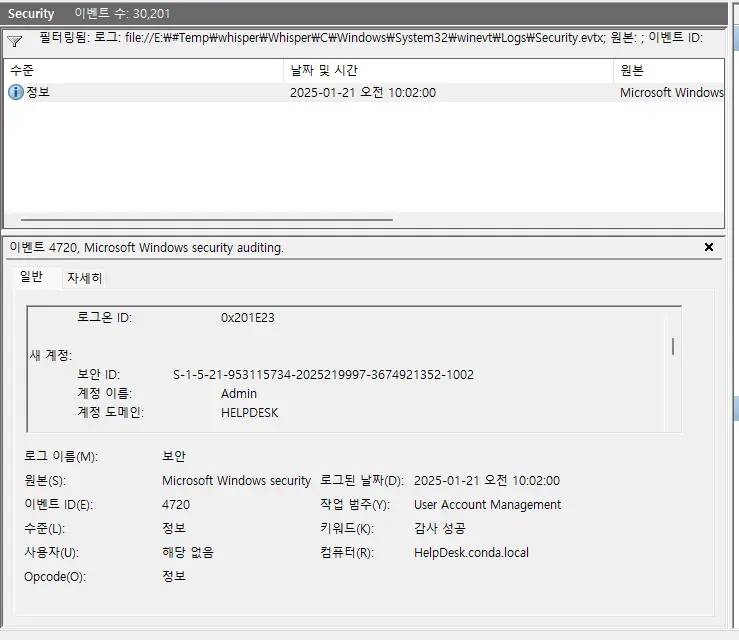
Answer : S-1-5-21-953115734-2025219997-3674921352-1002
Task 13
Task 13 : How many times has the newly created user logged in?
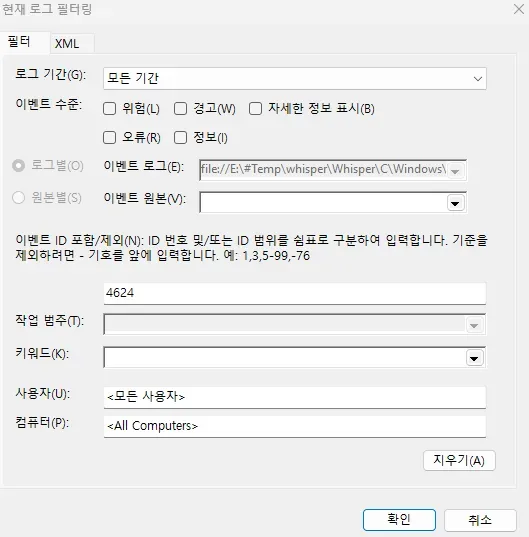
이번엔 로그인 이벤트 ID 4624를 필터링한다. 앞서 Admin 계정이 2025-01-21 오전 10:02:00 시에 생성되었으니 이후 이벤트들만 확인하면 된다. 확인 결과 Admin 계정으로 접속한 이력은 없었다.
Answer : 0
Task 14
Task 14 : What is the password of the newly created user?
공격자가 Admin 계정 생성 당시 정확히 어떤 패스워드를 사용했는지 알기 어려우니 SAM, SYSTEM 파일을 사용하여 해시 값을 추출해야 한다.
Kali 리눅스에서 Impacket 툴 중 하나인 secretsdump.py 를 사용했다. 앞서 복구한 SAM, SYSTEM 파일 경로를 입력으로 줘야한다.
$ impacket-secretsdump -sam SAM -system SYSTEM LOCAL
Impacket v0.13.0.dev0 - Copyright Fortra, LLC and its affiliated companies

[*] Target system bootKey: 0x92844110d6639aa82bed018e5800b3b1
[*] Dumping local SAM hashes (uid:rid:lmhash:nthash)
Administrator:500:aad3b435b51404eeaad3b435b51404ee:31d6cfe0d16ae931b73c59d7e0c089c0:::
Guest:501:aad3b435b51404eeaad3b435b51404ee:31d6cfe0d16ae931b73c59d7e0c089c0:::
DefaultAccount:503:aad3b435b51404eeaad3b435b51404ee:31d6cfe0d16ae931b73c59d7e0c089c0:::
WDAGUtilityAccount:504:aad3b435b51404eeaad3b435b51404ee:2e89df757ab47fdeae4dab97bad94ec6:::
A7md-NaS3eR:1001:aad3b435b51404eeaad3b435b51404ee:b2028254cc47c60901cae57393e6a547:::
Admin:1002:aad3b435b51404eeaad3b435b51404ee:58a478135a93ac3bf058a5ea0e8fdb71:::
[*] Cleaning up...
Admin 계정의 암호 해시 값을 얻었으니 hashcat으로 크래킹한다.
$ echo "58a478135a93ac3bf058a5ea0e8fdb71" > hash.txt
$ hashcat -m 1000 hash.txt rockyou.txt
hashcat (v7.1.2) starting

... 중략 ...

58a478135a93ac3bf058a5ea0e8fdb71:Password123
Answer : Password123